
Public demoProduct · Condominium management

Condomira – An all-in-one platform for condominium management companies

A company website, a condominium portal for building managers, residents and the front desk, and an admin panel with a CMS, all in one EM Soluções Digitais product, with a public demo you can try.

Condomira is a fictional brand created for the platform's public demo.

At a glance

Senior Design Engineer
My role
Apr–Oct 2026
Timeline
Solo, from design to deploy
Team
apps in a monorepo
3
pages
37
database tables
22
portal PageSpeed on mobile
95
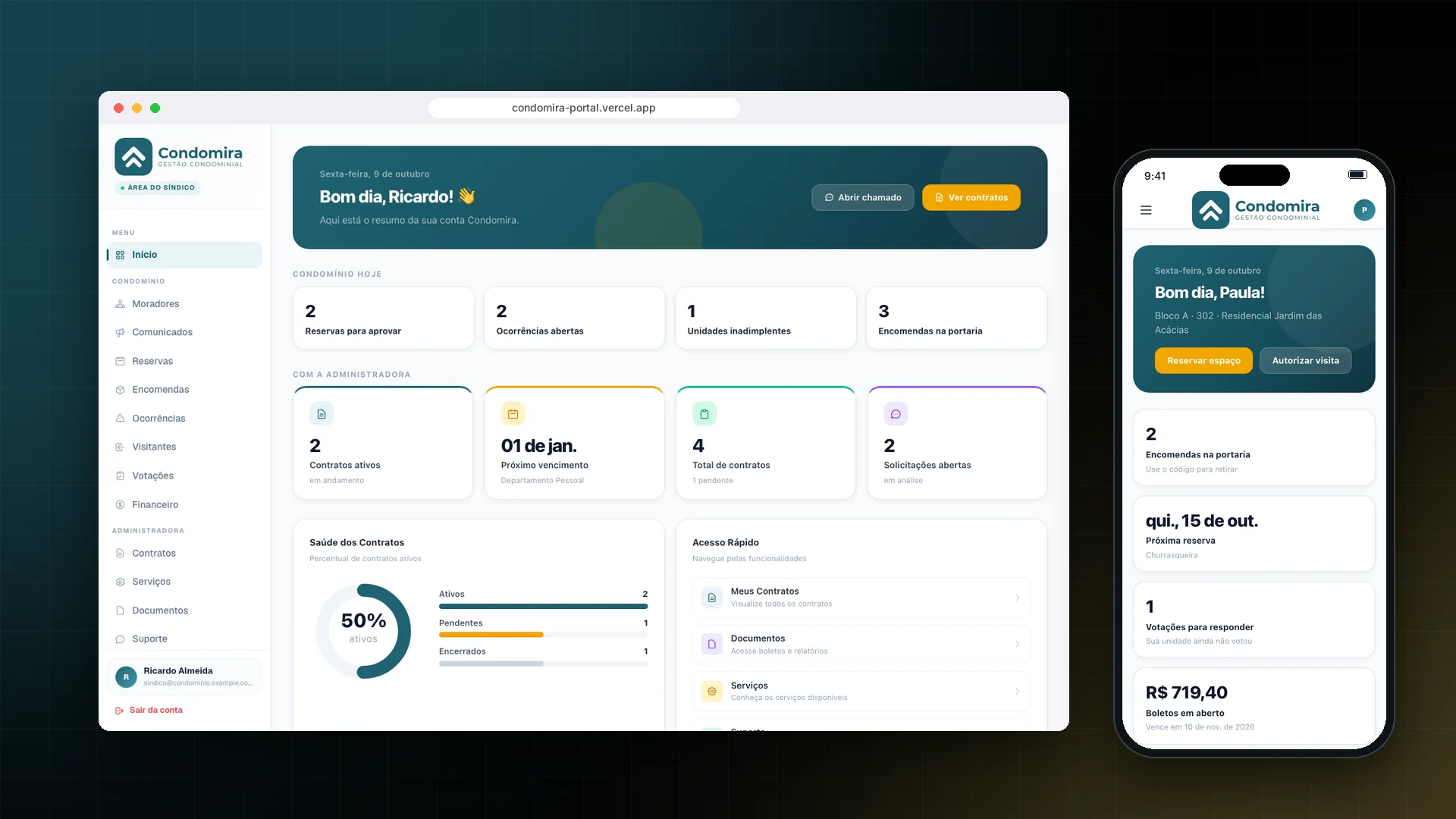
Condomira on desktop and mobile

Visual identity

Logo and identity designed by me

A brand created for the platform's public demo. The name, logo and contacts live in a single file, swapped for each management company.

Logo

Condomira Gestão Condominial logoLight background
Dark background

Concept

Two roofs shaped like arrows, cut out of a rounded square: the buildings and the idea of moving forward together. A single, sober shade of petrol blue, and the name in a geometric sans that works from the app icon on the phone to the top of the portal.

Designed by Estevão Marques · 2026

Palette · click to copy

Headings

Condomira

Montserrat

Headings and calls to action on the website, portal and admin panel.

Body

Condominium management

Inter

Body text, forms and tables.

Logo variations

  • Condomira Gestão Condominial logo (Horizontal)
    Horizontal
  • Condomira Gestão Condominial logo (Symbol)
    Symbol

Where the brand is used

  • App icon and favicon

    The symbol alone in the browser tab and on the phone's home screen, where the portal is installed as an app.

  • Website, portal and admin panel

    Horizontal logo at the top of the management company's website, in the portal sidebar and in the admin panel.

  • White footer and sign-in

    On the petrol blue of the footer and the portal sign-in screen, the logo appears all in white.

The challenge

Condominium management companies usually run on a generic company website, a third-party portal for the building manager and spreadsheets for everything else. Inside the building, the routine is even more scattered: packages logged in a notebook at the front desk, party-room bookings arranged by text message and votes held on paper. Each system has its own password, its own look and its own data. The challenge was to bring everything together in a single product, under the management company's brand, that could be adapted to a new client without rewriting code.

The solution

We built Condomira as a monorepo with three Next.js apps that share the database, authentication and components: the company website, the condominium portal and the admin panel with a CMS. The portal serves three roles, building manager, resident and front desk, each with its own menu and home screen, and it can be installed on a phone like an app. The management company's name, contacts and WhatsApp live in a single brand file, so adapting the platform to a new client means changing the brand, not the code.

The product

Three apps, one platform

Everything is live. The portal has three roles, building manager, resident and front desk, each with its own menu and home screen. Open each app and sign in with the demo credentials below.

The company website in the Condomira demo
01

Company website

The management company's storefront: each service has its own page with an indexable URL, and the contact form sends the lead straight to the admin panel.

  • Home, services, case studies, about and contact
  • Contact form with lead capture
Open company website
The building manager's home screen in the Condomira portal, with the Condominium today summary
02

Building manager portal

The building manager signs in and sees the condominium's day: bookings to approve, open issues, units in arrears and packages at the front desk. From the same portal they publish announcements, open votes, give residents and the front desk access, and follow contracts and requests with the management company.

  • "Condominium today" summary on the home screen
  • Resident and front-desk access with a temporary password
  • Announcements, bookings, issues and votes
  • The month's collections and arrears by unit
  • Contracts, documents and requests with the management company
Open building manager portal
The resident's home screen in the Condomira portal, with packages, the next booking, a vote and bills
03

Resident portal

Built for mobile and installable as an app. Residents see the packages that have arrived with their pickup code, book the party room or the barbecue area, authorize visitors, vote in condominium polls and download a copy of their monthly fee bill.

  • Packages with a pickup code
  • Bookings with the rules of each space
  • Authorized visits sent straight to the front desk
  • Votes with one vote per unit
  • Monthly fee copies and condominium documents
Open resident portal
The front desk screen in the Condomira portal, with expected visitors and packages awaiting pickup
04

Front desk

The doorman logs the package and the resident receives the pickup code. Visits authorized by residents appear on the day's list, and the entry is logged with one tap.

  • Package arrivals and pickups
  • Today's expected visitors and the day's entries
  • Condominium announcements
Open front desk
The billing screen of the Condomira admin panel, with each unit's monthly fee
05

Admin panel

Where the management company's team works: they register clients and contracts, answer requests, post each condominium's monthly fee with the bill as a PDF, choose which documents residents can see, follow the website's leads and edit the copy through the CMS.

  • Dashboard, leads, clients, contracts and requests
  • Billing: the month's fee per unit, payments and PDF bills
  • Documents shared with residents
  • CMS and users
Open admin panel

How the demo works: feel free to create, edit and delete anything. The data goes back to its original state every day at 3 am (Brasília time). The CMS, file uploads and email notifications are turned off, and search engines do not index the site.

Inside the portal

Admin panel built for Condomira

Each module appears for whoever needs it. Every action is checked on the server against the role and the condominium of the signed-in user.

Bookings in the Condomira building manager portal, with requests to approve and rules for each space

The needEach shared space has its own rules, and some need the building manager's approval.

What was builtThe building manager approves or declines requests and sets up each space: fee, notice period, monthly limit and whether approval is required.

Fictitious data
Finances in the Condomira building manager portal, with collections, overdue units and billing periods

The needThe building manager needs to see overdue payments without asking the management company for a report.

What was builtThe month's collections, overdue units with the amount owed and the percentage paid in each billing period.

Fictitious data
Support tickets in the Condomira admin panel, with status and the reply to the building manager

The needThe building manager's requests to the management company got lost in email.

What was builtTickets with a status (open, in progress, resolved) and the management company's reply, which shows up in the building manager's portal.

Fictitious data
Content editor in the Condomira admin panel, with the home page sections

The needThe management company wants to edit its own website without an agency.

What was builtA content editor by page and section: hero, numbers, about, differentiators, testimonials, call to action and contact.

Fictitious data
The resident's home screen in the Condomira portal on a phone

On the phone

The needResidents handle everything from their phone.

What was builtA resident home screen with packages at the front desk, the next booking, votes and bills, in a portal that can be installed as an app.

Fictitious data

The condominium routine in one place

Packages

The front desk logs each arrival and the resident picks it up with a code. The history shows who picked it up and when.

Bookings

Party room, barbecue area and court, with fees, minimum notice and a monthly limit. When a space requires it, the building manager approves or declines.

Visitors

The resident authorizes the visit, the front desk sees the day's list and logs the entry.

Issues

The resident reports a problem and follows the building manager's reply through the portal.

Votes

Polls with a deadline and partial results for the building manager, with one vote per unit.

Announcements

Notices from the building manager to the whole condominium, with the most important ones pinned to the top.

Finances

For the building manager, the month's collections and arrears by unit. For residents, their bills and duplicate copies.

Billing

In the admin panel, the management company posts the month's fee for every unit, records payments and attaches the bill as a PDF.

Email notifications

Package received, visitor at the front desk, booking approved or declined, new vote: each event notifies whoever needs to know.

Design in Figma

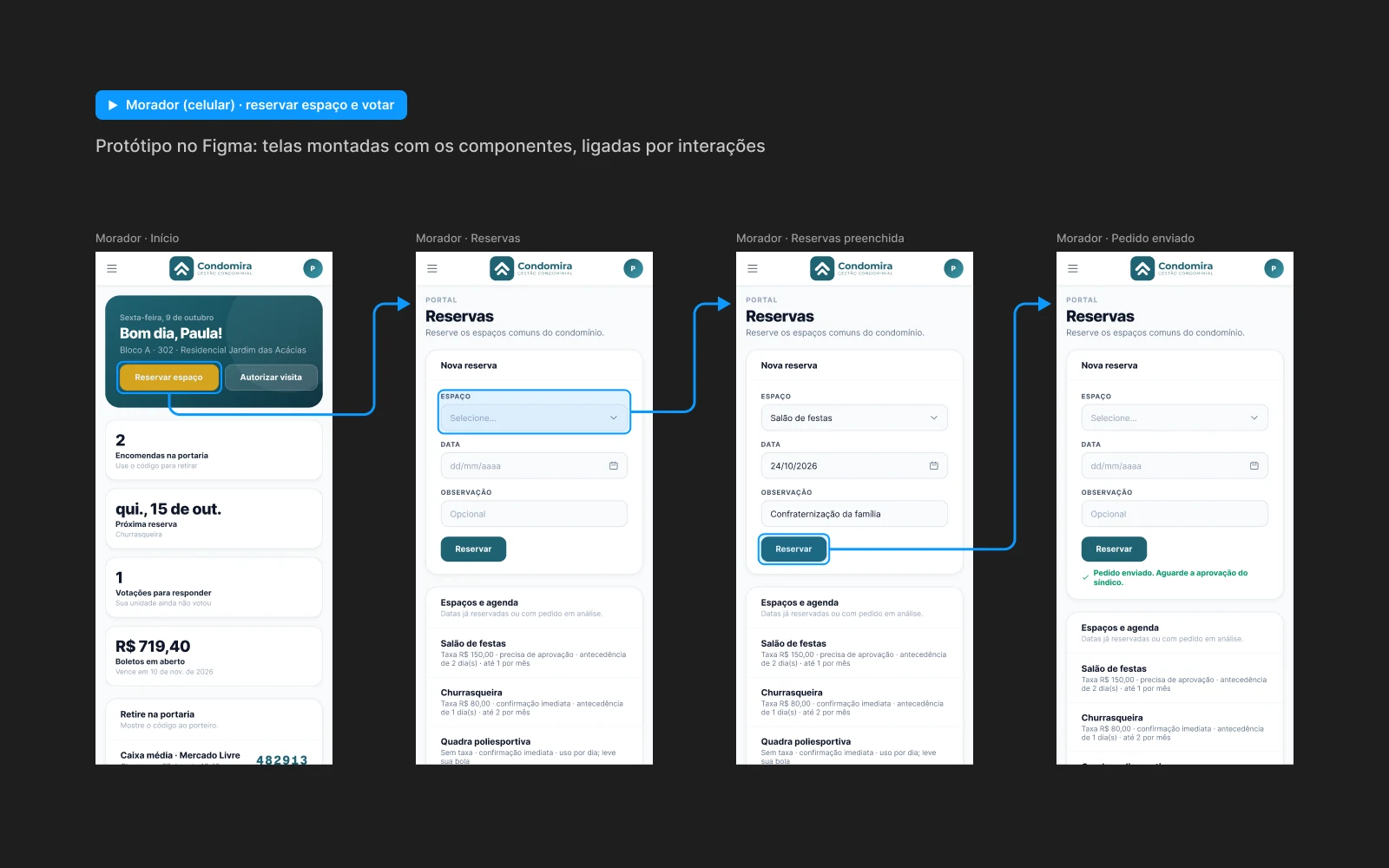
From design system to prototype

Condomira in Figma
Prototype flow in Figma: the resident's home, bookings, the completed form and the request sent, connected by interaction arrowsOpen the prototype

Technology

The tech stack

Next.js

Version 16: three apps with the App Router and Turbopack. Each service on the website has its own route that Google can index, and the portal is installable as a PWA.

TypeScript

End-to-end typing, from the database schema to the components of all three apps.

Tailwind CSS

Version 4. A shared design system: the website, portal and admin panel use the same components.

Prisma

A single schema for all three apps, with a seed that recreates the demo data.

Neon Postgres

Serverless PostgreSQL shared by the website, portal and admin panel.

Auth.js

Version 5. Email and password sign-in (bcrypt) for the portal and the admin panel, with separate sessions and building manager, resident and front-desk roles.

Vercel

Three projects deployed on every push, documents and bills in private Blob storage, and a Cron job for the daily demo reset.

Resend

Portal email notifications: package received, visitor at the front desk, bookings, votes and issues.

Engineering

Technical highlights

01

Three apps, one codebase

Website, portal and admin panel in a monorepo: the same database, the same authentication and the same components.

02

One portal, three roles

Building managers, residents and the front desk sign in to the same portal, each with their own menu and home screen. Admin panel accounts cannot access the portal.

03

Installable on mobile

The portal is a PWA: residents add it to their home screen and use it like an app, without going through an app store.

04

Brand set in a single file

The management company's name, contacts and WhatsApp live in a single brand file. A new client means a new brand, with the same code.

05

Private documents per condominium

Files are kept in private storage: the admin panel uploads and deletes them, the portal only serves each document to the condominium it belongs to, and the management company chooses what residents can see.

06

A demo that resets itself

The data goes back to its original state every day at 3 am. In the demo, the CMS, file uploads and email notifications are turned off, and search engines do not index the site.

The impact

One product instead of several vendors: website, building manager portal, resident app and front-desk control, under the management company's own brand and domain.

For management companies

Want the platform with your brand?

We adapt the website, portal and admin panel to your management company's identity, with your services, contacts and domain.